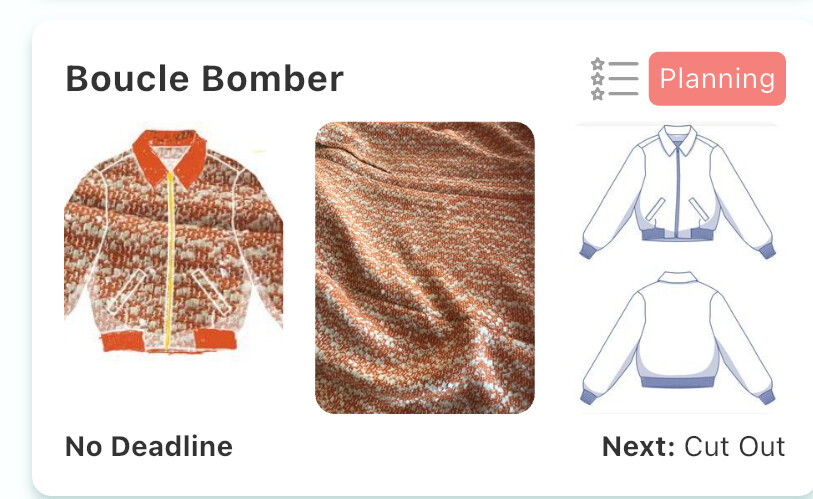
Eeee I got too excited and couldn’t wait to spill the beans here ahead of the official launch on Friday 16th May! I told you I was bad at keeping secrets
Magic Mockup is a new free tool powered by Stash Hub. It helps sewists visualise sewing projects in seconds (without having to learn any new skills)! The tool combines fabric photos and line drawings to create inspiring and shareable images of your sewing plans.
Here’s an early look at Magic Mockup before it goes live on Friday 16th May. Try it here: https://mockup.stashhubapp.com/
Feel free to test it out using fabric and patterns from your stash!
Here’s a blog post with some more info about Magic Mockup:
Thanks to our Beta testers for sending in their feedback about Magic Mockup. We’ve already got some ideas for how we can improve this tool in the future.
Really excited to hear what you all think about Magic Mockup! If you love it, please share far and wide on Friday 16th May. Doug and I think this tool could be really useful and want to make it accessible to as many sewists as possible. Please tag @stash_hub if you share to Instagram.
P.S. If you fancy a live demo of Magic Mockup and the chance to ask us any questions, come along to our Zoom on Monday 12th May at 7pm BST Launch Meeting - Zoom
Really lovely feature and i think it will really appeal to people like me who love a busy print. Just given it a quick go on a project i am working on (not started yet) but its lovely to have an image on what you’re working towards! I downloaded the image and made it thr first WIP photo!
Oh my gosh - this is simply amazing @BlossomSandwich & @TheWizard ! Thankyou - I can’t wait to use it.
I’d love to join the live Zoom, but not sure if I’m going to want to get up at 4am (East coast, Australia).
L.O.V.E. Have been wanting to do this forever and had a list of tutorials to learn how to do this and now you make it so easy!! Thank you so much, this is why I LOVE Stashhub!!
I’m really excited about this, but also a little confused. When I tried it I needed to use images downloaded from my device and not imported from the app. Have I done something wrong or is that how it’s supposed to work? Will there be options for color blocking?
You need to download your pattern and fabric picture from Stash Hub before you do the mock up. (I got caught with that last night forgot to download the line drawing so had to start again).
Colour blocking isn’t possible at the moment but having said that, on iPad when I went to save the mock-up it offered me the option of opening in Sketchbook so I could edit the image if required.
Magic Mockup is fantastic! It took a little while to get the hang of it, but I was off and running as soon as I did. It’s brought my Just An Idea projects to life.
I had a play with Magic Mock-up (MM) and Sketchbook this evening. (Fabric pic predates MM so I just used what I had and didn’t retake a flat fabric pic).
MM did most of the work then I played with enhancing it. In projects I added the picture as work in progress to see it on my project/queue page.
 I told you I was bad at keeping secrets
 Try it here: https://mockup.stashhubapp.com/
 feature - nice work