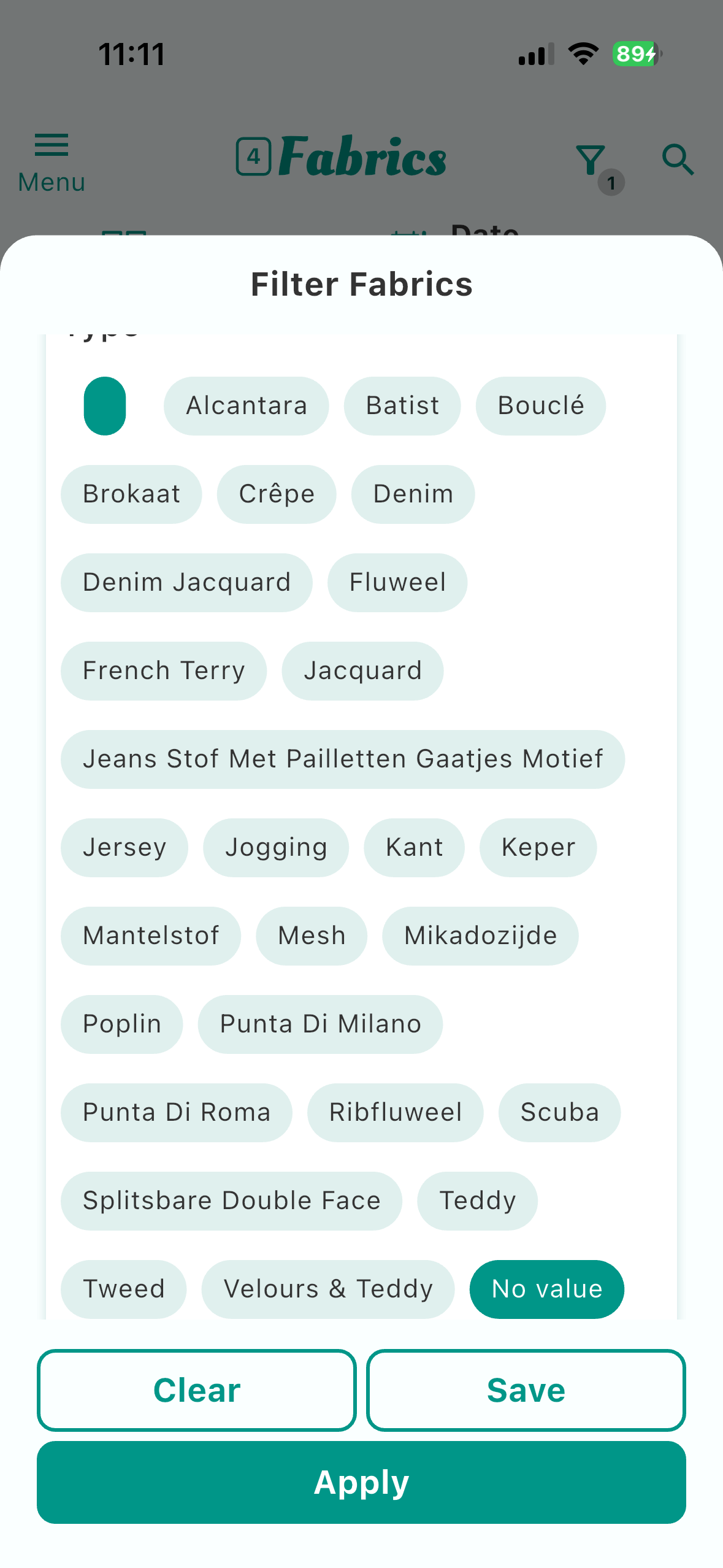
In the filter, two different values appear for the same thing under ‘Type of fabric’: a space and no value.
The first gives the fabrics where I typed something in and then deleted it. The second gives the fabrics where I left the field blank.
Why is there this difference?
You can edit the suggestions in the settings. More info here: Field Suggestions | Stash Hub Help
I didn’t ask my question clearly enough. The filter for fabrics contains all the fabric types I’ve added so far. I can indeed manage these via settings, field suggestions.
However, at the top there’s an empty value and at the bottom it says ‘no value’. If I select either of them, I see a different result. ‘No value’ is clear: that means I haven’t entered anything. But the value at the top (a space?), where does that come from? If I filter on that, I see different fabrics than when I click on ‘no value’. I’ve checked this and there really is nothing in the ‘fabric type’ field, not even a space.
See Picture
Hi. Thanks for clarifying.
The empty value at the top is as you guess, likely a space. The best thing to do would be to go to https://web.stashhubapp.com/profile/suggestions and into the Fabric Type one. There should be a blank option there which you can delete.
1 Like